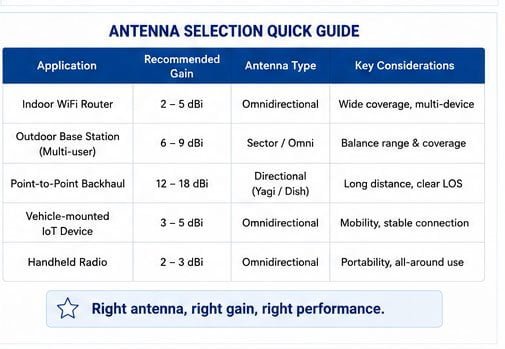
Are you struggling with weak WiFi signals or constant dropouts in your facility? You might be using the wrong type of antenna. Many businesses waste money deploying the wrong antenna solution, leading to poor coverage and frustrated users.
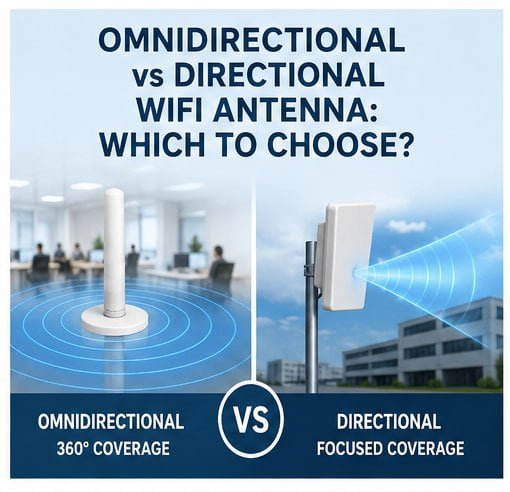
The main difference between omnidirectional and directional WiFi antennas lies in their radiation pattern. Omnidirectional antennas broadcast signals in all directions equally (360-degree coverage), making them ideal for general area coverage. Directional antennas focus signals in one specific direction, providing longer range and stronger signal strength for point-to-point connections or targeted coverage areas.
I have worked with hundreds of customers over the past 17 years, and I can tell you that choosing the wrong antenna type is one of the most common mistakes I see. Let me walk you through everything you need to know to make the right choice for your specific situation.
Omnidirectional vs Directional WiFi Antennas: Key Differences Explained
Do you wonder why some WiFi setups work perfectly while others constantly fail? The antenna type plays a huge role. Most people simply install antennas without understanding how each type actually works.
Omnidirectional antennas radiate RF energy uniformly in all horizontal directions, creating a donut-shaped coverage pattern. Directional antennas concentrate energy in a specific direction (typically 30-90 degrees beamwidth), achieving higher gain and longer distance. This fundamental difference determines which antenna type suits your application best.
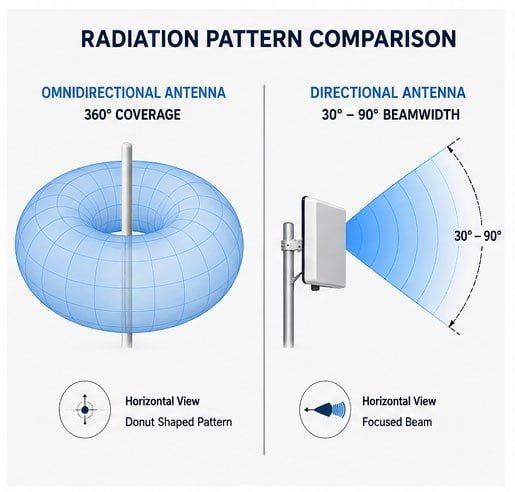
Let me break down the technical differences in practical terms. When I install an omnidirectional antenna in a warehouse, the signal spreads equally in all directions. This sounds good at first, but it means the signal strength decreases rapidly as distance increases. The antenna wastes energy broadcasting to areas where nobody needs coverage.
In contrast, directional antennas focus all their energy in one direction. Think of it like a flashlight versus a lightbulb. The flashlight (directional antenna) sends a strong, focused beam far ahead. The lightbulb (omnidirectional antenna) lights up the entire room but with much less intensity.
Here are the key technical differences:
| Feature | Omnidirectional Antenna | Directional Antenna |
|---|---|---|
| Coverage Pattern | 360-degree horizontal | 30-90 degree focused beam |
| Typical Gain | 2-9 dBi | 8-24 dBi |
| Maximum Range | 50-200 meters | 200-5000 meters |
| Beamwidth | Wide (omnidirectional) | Narrow (focused) |
| Signal Strength | Moderate in all directions | Strong in target direction |
| Installation Complexity | Simple (no precise aiming) | Requires precise alignment |
| Best Use Case | General area coverage | Point-to-point links |
| Interference Level | Higher (broadcasts everywhere) | Lower (focused signal) |
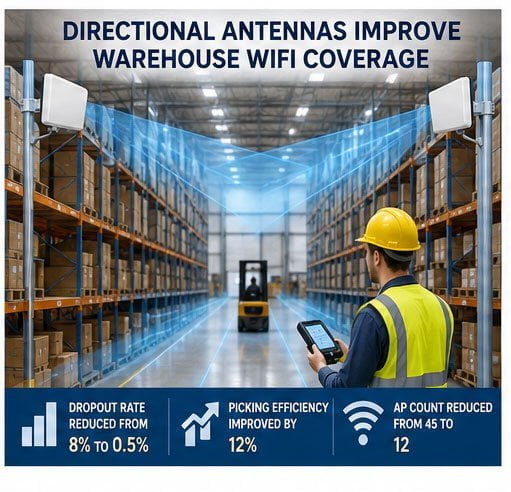
I recently helped a logistics company with a 20,000 square meter warehouse. They had 15 omnidirectional ceiling-mounted antennas causing major problems. Workers using handheld PDA scanners experienced constant signal drops because the 12-meter-high metal shelving created what we call a "canyon effect." The omnidirectional signals scattered in all directions, bouncing off metal surfaces and creating dead zones in the aisles.
We tested both approaches in a 150-meter-long, 12-meter-high main aisle. The original omnidirectional setup required multiple access points, creating co-channel interference. PDAs experienced "fake connections" where the device showed connected but data would not transmit.
After switching to directional antennas positioned at both ends of the aisle, pointing directly down the corridor, we reduced the dropout rate from 8% to 0.5%. Workers no longer needed to hold their PDAs high searching for signal. Picking efficiency improved by 12%. We eventually reduced the entire facility from 45 access points to just 12, saving them significant equipment and maintenance costs.
Directional or Omnidirectional WiFi Antenna: Which One Fits Your Needs?
Are you deploying WiFi in an open office or connecting two buildings across a distance? Your specific use case determines which antenna type makes sense. I have seen customers waste thousands of dollars because they chose based on price rather than application requirements.
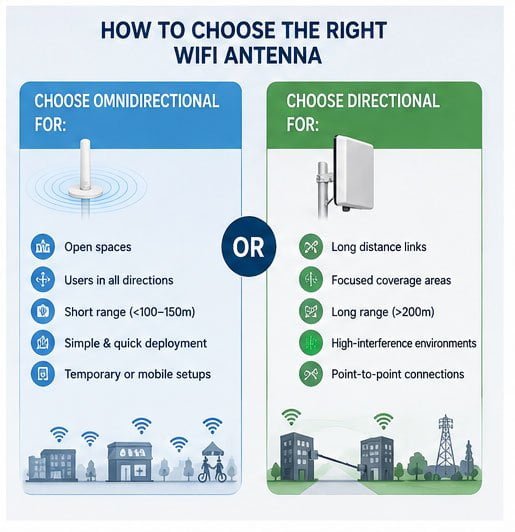
Choose omnidirectional antennas when you need general coverage in open spaces where users move freely in all directions. Select directional antennas when you need long-distance links, focused coverage in specific areas, or want to minimize interference from unwanted directions. Your physical environment and user mobility patterns determine the best choice.
Let me help you identify your specific needs through practical scenarios. The decision comes down to understanding your coverage requirements, physical obstacles, user density, and performance expectations.
For omnidirectional antennas, I recommend these situations:
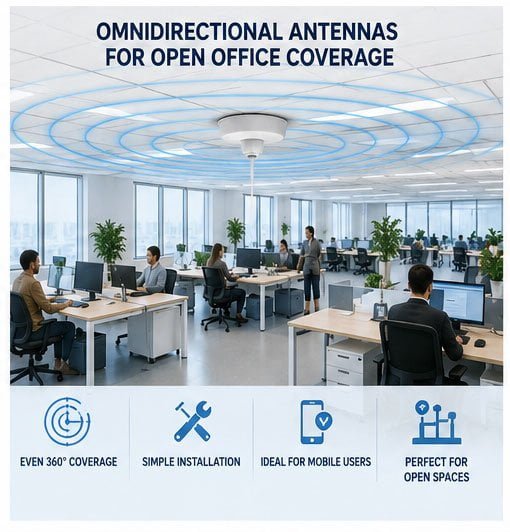
Open Office Spaces: When you have a large open floor plan with workers spread throughout, omnidirectional antennas mounted on the ceiling provide even coverage. I recently installed four 5dBi omnidirectional antennas in a 1,000 square meter office, giving complete coverage for 80 employees.
Retail Stores: Customers move randomly throughout the store. You need consistent coverage everywhere, not just in one direction. Omnidirectional antennas ensure shoppers can use mobile payment systems anywhere in the store.
Outdoor Events: For temporary WiFi at festivals or markets, omnidirectional antennas on poles provide coverage to crowds gathering around the antenna in all directions.
Small Warehouses: If your warehouse is under 5,000 square meters with moderate shelving heights (under 4 meters), omnidirectional ceiling antennas often work fine.
For directional antennas, I strongly recommend these applications:
Long Narrow Spaces: Warehouse aisles, long corridors, or tunnels benefit enormously from directional antennas. The antenna aims down the length of the space, providing strong signal throughout.
Point-to-Point Links: Connecting two buildings across a distance requires directional antennas on both ends pointing at each other. I recently set up a 800-meter link between two factory buildings using 18dBi panel antennas, achieving stable 300Mbps throughput.
High-Interference Environments: When you have many neighboring WiFi networks, directional antennas reduce interference by ignoring signals from unwanted directions. This works great in dense urban areas or apartment buildings.
Outdoor Long-Range Coverage: Providing WiFi across a large outdoor area like a parking lot or agricultural field requires directional antennas to reach the required distances.
Here is a simple decision matrix I use with customers:
| Your Situation | Recommended Antenna Type | Reason |
|---|---|---|
| Users in all directions from AP | Omnidirectional | Even coverage needed |
| Long narrow corridor/aisle | Directional | Focused coverage more efficient |
| Distance > 200 meters | Directional | Higher gain reaches farther |
| Open space < 100 meters | Omnidirectional | Simpler deployment |
| Heavy metal/concrete obstacles | Directional | Focused signal penetrates better |
| Multiple APs nearby | Directional | Reduces co-channel interference |
| Temporary/mobile setup | Omnidirectional | No aiming required |
| Fixed point-to-point link | Directional | Maximum efficiency |
One customer runs a large outdoor equipment yard spanning 40,000 square meters. They originally tried omnidirectional antennas but could not get reliable coverage beyond 80 meters. We installed four 14dBi sector antennas (a type of directional antenna) on a central tower, each covering a 90-degree sector. This gave them complete coverage across the entire yard with just four antennas instead of the 20+ omnidirectional antennas they would have needed.
Omnidirectional vs Directional Antennas: Choosing the Best WiFi Solution
How do you actually make the final decision when both types seem viable? I walk through a systematic evaluation process with every customer to avoid costly mistakes. The wrong choice means poor performance and expensive do-overs.
Start by mapping your coverage area, identifying obstacles, measuring distances, and defining your performance requirements. Then calculate the link budget for both antenna types considering gain, cable losses, and receiver sensitivity. The solution that meets your requirements with the lowest total cost of ownership wins.
Let me share my practical evaluation process that I have refined over years of installations. This systematic approach eliminates guesswork and ensures you get the right solution the first time.
Step 1: Map Your Coverage Requirements
I always start by drawing a physical map of the area. Mark where users need WiFi access, note any metal structures or concrete walls, and identify interference sources. For the warehouse customer I mentioned earlier, I walked every aisle with a measuring wheel, noting shelf heights, aisle widths, and metal density.
Step 2: Define Performance Requirements
What speeds do you need? How many concurrent users? What applications will run on the WiFi? A warehouse scanner only needs 1-2 Mbps per device, but a video surveillance system might need 8-10 Mbps per camera. Different requirements lead to different antenna choices.
Step 3: Calculate Link Budget
This sounds complex but is actually straightforward. The link budget determines if your signal will be strong enough at the furthest point. The formula is simple:
Received Signal = Transmit Power + Antenna Gain - Cable Loss - Path Loss
For omnidirectional antennas, typical gain is 2-9 dBi. For directional antennas, typical gain is 8-24 dBi. This gain difference often determines whether you can reach distant users with acceptable signal strength.
Step 4: Consider Obstacles and Interference
Metal shelving typically causes 10-20 dB of additional loss. Concrete walls add 8-15 dB. If your environment has many obstacles, directional antennas often work better because their higher gain compensates for these losses.
Step 5: Count Total Cost
Do not just compare antenna prices. Calculate the total system cost including access points, cables, installation labor, and ongoing maintenance. In the warehouse project, directional antennas cost more per unit ($45 vs $25 for omnidirectional), but we needed far fewer access points. Total project cost dropped from $28,000 to $16,000.
Here is a comparison table I show customers:
| Evaluation Factor | Omnidirectional Solution | Directional Solution |
|---|---|---|
| Antenna Cost | Lower per unit | Higher per unit |
| Number of Antennas Needed | More antennas required | Fewer antennas needed |
| Installation Complexity | Simple (no aiming) | Moderate (requires alignment) |
| AP Count | More APs needed | Fewer APs needed |
| Cable Runs | Longer total cable length | Shorter total cable length |
| Power Consumption | Higher (more APs) | Lower (fewer APs) |
| Maintenance Points | More equipment to maintain | Fewer maintenance points |
| Interference Management | More challenging | Easier to control |
| Future Scalability | May need more APs later | Often scales better |
| Total 5-Year Cost | Often higher | Often lower |
I recently helped a customer choose between these options for their manufacturing facility. The initial quote with omnidirectional antennas was cheaper: $12,000 versus $15,000 for directional antennas. But when we calculated five-year costs including power, maintenance, and the improved productivity from better WiFi performance, the directional solution actually saved them $8,000 over five years.
Another important consideration is future growth. If you might expand your coverage area or add more devices later, directional antennas often provide better scalability. You can adjust antenna positions or add targeted coverage without redesigning the entire system.
Directional vs Omnidirectional WiFi Antenna: Pros, Cons, and Use Cases
What real-world trade-offs should you expect with each antenna type? I want to be honest about both the benefits and limitations of each option. Every antenna type has situations where it excels and situations where it fails.
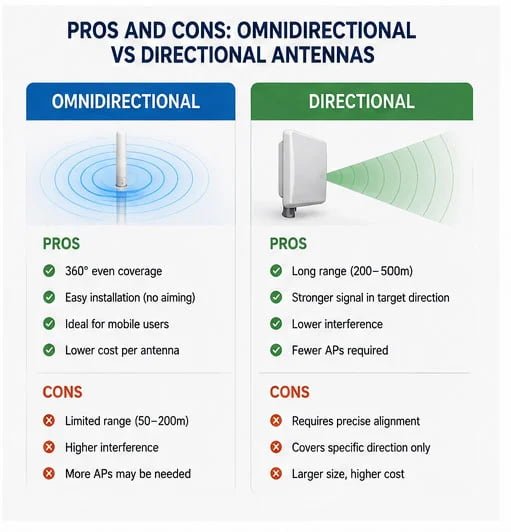
Omnidirectional antennas excel in simplicity and even coverage but suffer from limited range and higher interference. Directional antennas provide superior range and focused coverage but require precise alignment and only cover specific areas. Neither type is universally better - each fits specific applications where its strengths outweigh its weaknesses.
Let me lay out the honest pros and cons based on my real installation experience. I have learned these lessons through both successes and failures over the years.
Omnidirectional Antenna Advantages:
The biggest advantage is installation simplicity. You mount the antenna, power it up, and you are done. No need to aim it precisely or worry about alignment. When I install omnidirectional antennas in an office, installation takes 15-20 minutes per antenna. The same project with directional antennas takes 35-45 minutes per antenna because of alignment requirements.
Omnidirectional antennas work great when users move randomly. In a retail store, customers walk throughout the space. An omnidirectional antenna provides consistent coverage regardless of where they go. You do not need to predict movement patterns or create overlapping coverage zones.
These antennas also work well for temporary or mobile installations. At outdoor events or construction sites, you can quickly set up WiFi without complex site surveys or alignment procedures.
Omnidirectional Antenna Disadvantages:
The main limitation is range. Because the signal spreads in all directions, the signal strength at any given point is lower compared to a directional antenna with the same power. In open outdoor spaces, omnidirectional antennas typically reach 50-150 meters effectively. Beyond that, signal becomes too weak for reliable connections.
Interference is another serious issue. The antenna receives signals from all directions, including interference from neighboring WiFi networks, Bluetooth devices, and other 2.4GHz sources. In my warehouse project, this omnidirectional reception caused major problems with co-channel interference between the 15 access points.
These antennas also waste energy broadcasting to areas where no one needs coverage. In the warehouse aisles, the omnidirectional antennas were sending signals up toward the ceiling and down below the floor level where no devices existed.
Directional Antenna Advantages:
Range is the biggest win. By focusing all energy in one direction, directional antennas reach much farther. I have installed links over 5 kilometers using high-gain directional antennas. Even moderate directional antennas easily reach 300-500 meters in outdoor environments.
Interference rejection is another major benefit. The antenna ignores signals coming from behind and the sides. In the warehouse, this eliminated the co-channel interference problems. Each directional antenna only "heard" devices in its coverage area, not signals from other access points.
These antennas provide much higher signal strength in the target direction. The warehouse workers went from having marginal -75dBm signals with omnidirectional antennas to strong -55dBm signals with directional antennas. This translated to faster data rates and zero dropouts.
Directional Antenna Disadvantages:
Installation complexity is the main challenge. You must aim directional antennas precisely at the target area. A few degrees off can significantly reduce performance. I spend extra time during installation using signal strength meters to optimize antenna positioning.
These antennas only cover specific areas. If you need coverage in multiple directions, you need multiple directional antennas. This works fine for fixed patterns like warehouse aisles, but becomes impractical for areas where coverage needs change frequently.
Physical size can also be an issue. High-gain directional antennas are often larger and heavier than omnidirectional antennas. This can create aesthetic concerns in customer-facing areas or structural concerns with ceiling mounting.
Here is a real-world use case comparison:
| Use Case | Best Antenna Type | Why It Works | Common Issues to Avoid |
|---|---|---|---|
| Restaurant WiFi | Omnidirectional | Customers sit everywhere | Avoid over-coverage to sidewalk |
| Warehouse Aisles | Directional | Long narrow spaces | Do not use omnidirectional |
| Office Meeting Rooms | Omnidirectional | Even coverage needed | Watch for wall penetration issues |
| Outdoor Point-to-Point | Directional | Maximum range required | Must have clear line of sight |
| Retail Store | Omnidirectional | Random customer movement | Watch out for interference |
| Parking Lot Coverage | Directional | Large area, fixed shape | Ensure proper sector overlap |
| Multi-Story Building | Omnidirectional | Vertical coverage needed | Avoid floor-to-floor interference |
| Agricultural Field | Directional | Very long range required | Account for weather effects |
One of my most challenging projects involved a manufacturing plant with both office areas and production floors. The office areas needed omnidirectional coverage for mobile workers. The production floor had long assembly lines that required directional