I remember when a customer called me last month. His factory WiFi kept dropping. He tried three different routers. Nothing worked. Then I asked him one question: "What antenna are you using?" He went silent. Most people ignore antennas. But the antenna decides if your WiFi signal reaches where you need it.
Choosing the right WiFi antenna in 2026 depends on three factors: your frequency band (2.4GHz or 5GHz), your coverage area (indoor or outdoor), and your antenna type (omnidirectional or directional). Match these to your actual needs, and you'll get stable, long-range WiFi connectivity.
Now let me walk you through everything I've learned in 17 years of making antennas. I'll show you exactly how to pick the right one.
How to Choose the Best WiFi Antenna in 2026: A Complete Guide for Home and Industrial Applications
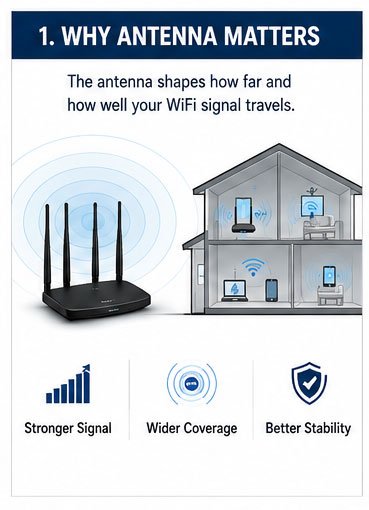
You need to understand what WiFi really is. WiFi is just radio waves. Your router sends out these waves. The antenna shapes how far and how well these waves travel.
The best WiFi antenna for 2026 matches your frequency band, environment, and distance needs. For home use within 50 meters, choose a 2.4GHz omnidirectional antenna. For industrial sites beyond 100 meters, select a 5GHz high-gain directional antenna with weatherproof housing.
Here's what separates good antennas from bad ones. I've tested thousands of antennas. The difference comes down to five things.
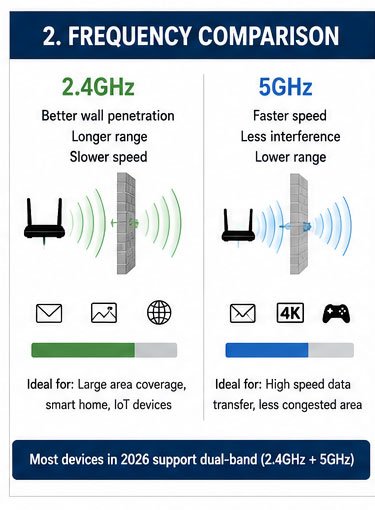
First, you need to know your frequency. 2.4GHz WiFi goes through walls better. It reaches further. But it's slower. 5GHz WiFi moves data faster. But walls block it more. In 2026, most devices use both. Your antenna should support both too.
Second, gain matters. Gain is measured in dBi. Higher gain means longer range. But there's a catch. High-gain antennas focus the signal in one direction. Low-gain antennas spread the signal everywhere. I use 3-5 dBi for home setups. I use 8-15 dBi for point-to-point industrial links.
Third, think about polarization. Most WiFi antennas use vertical polarization. Both your transmitter and receiver need to match. If one antenna points up and the other lies flat, your signal drops by 20 dB or more.
Fourth, consider your connector type. RP-SMA is common for consumer routers. N-type connectors work better for outdoor industrial setups. They handle more power. They seal better against weather. I always recommend N-type for anything outside.
Fifth, check the VSWR value. VSWR shows how much signal reflects back instead of radiating out. Good antennas have VSWR below 2.0. Great antennas stay below 1.5. We aim for 1.3 or lower in our factory.
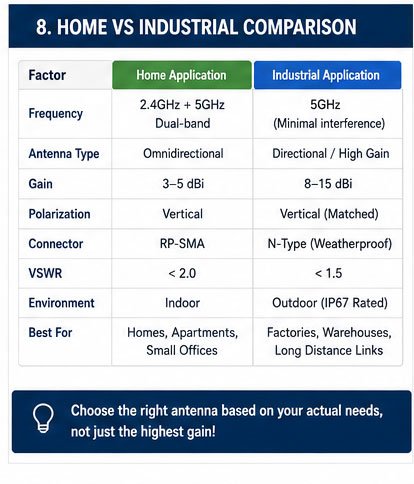
| Factor | Home Application | Industrial Application |
|---|---|---|
| Frequency | 2.4GHz + 5GHz dual-band | 5GHz for less interference |
| Gain | 3-5 dBi omnidirectional | 8-15 dBi directional |
| Polarization | Vertical | Vertical (matched pairs) |
| Connector | RP-SMA | N-type weatherproof |
| VSWR | <2.0 | <1.5 |
| Environment | Indoor | Outdoor IP67 rated |
Long-Range WiFi Antennas in 2026: How to Choose the Right One for Your Needs
Range is what everyone wants. But range depends on more than just the antenna. You need to understand the whole system.
For long-range WiFi in 2026, choose antennas based on your line-of-sight distance. Up to 300 meters with obstacles requires 2.4GHz 8dBi omnidirectional antennas. Beyond 500 meters with clear line-of-sight demands 5GHz 14-18dBi directional panel or Yagi antennas.
Let me tell you about a project we did last year. A warehouse needed WiFi coverage across 800 meters. They tried standard routers. Signal died after 100 meters. We installed two 5GHz 17dBi panel antennas pointing at each other. Perfect signal. Why did it work?
Distance and obstacles define your antenna choice. WiFi signal loses power as it travels. This is called path loss. At 2.4GHz, you lose about 100 dB over 1 kilometer in open air. At 5GHz, you lose about 106 dB. Every wall adds 5-10 dB loss. Every tree adds 10-20 dB loss.
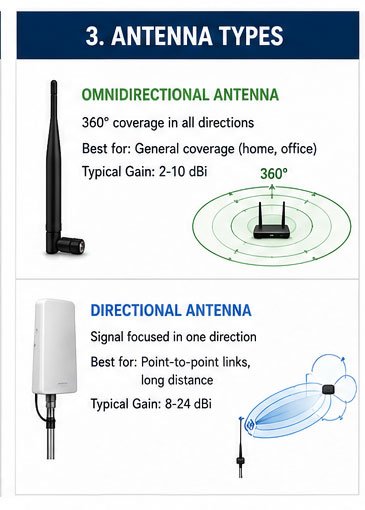
For home use up to 50 meters with normal walls, a standard 3-5 dBi omnidirectional antenna works fine. This gives 360-degree coverage. Everyone in your house gets WiFi. We ship thousands of these every month to router manufacturers.
For industrial sites from 100-300 meters with some obstacles, upgrade to 2.4GHz 8-10 dBi omnidirectional antennas. Mount them high. Height matters more than people think. Every meter of height adds significant coverage. I always tell customers: mount your antenna at least 3 meters high.
For point-to-point links beyond 500 meters with clear line-of-sight, switch to directional antennas. Panel antennas work great from 500-2000 meters. They give 14-18 dBi gain with a focused beam. Yagi antennas push even further. We have customers using our 24 dBi Yagi antennas for 5-kilometer links.
Weather protection becomes critical for long-range outdoor antennas. Look for IP67 rating minimum. This means complete dust protection and protection against water immersion. We use UV-resistant radomes and stainless steel mounting hardware. Cheap antennas fail within months outdoors.
Cable loss kills long-range setups. Many people buy great antennas but use cheap cables. Bad mistake. At 2.4GHz, standard RG58 cable loses 0.7 dB per meter. At 5GHz, it loses 1.2 dB per meter. Use LMR400 or better for runs over 10 meters. We pre-assemble all our industrial antennas with low-loss cable.
| Distance | Environment | Recommended Antenna Type | Gain (dBi) | Frequency |
|---|---|---|---|---|
| 0-50m | Indoor with walls | Omnidirectional | 3-5 | 2.4GHz/5GHz |
| 50-100m | Indoor open space | Omnidirectional | 5-8 | 2.4GHz |
| 100-300m | Outdoor with obstacles | Omnidirectional high-gain | 8-12 | 2.4GHz |
| 300-500m | Outdoor clear view | Directional panel | 14-16 | 5GHz |
| 500-2000m | Outdoor line-of-sight | Directional panel | 16-18 | 5GHz |
| 2000m+ | Outdoor perfect LOS | Yagi directional | 20-24 | 5GHz |
The Ultimate Guide to Choosing a Long-Range WiFi Antenna for Home and Industrial Use
Home and industrial needs are completely different. I see people making mistakes here all the time. They buy industrial antennas for home. Or worse, use home antennas for industrial sites.
Home WiFi antennas need 360-degree coverage with 3-8 dBi gain for even distribution across 50-100 meters. Industrial WiFi antennas require higher gain (12-18 dBi), directional focus, weatherproof construction, and support for multiple concurrent connections across 300+ meters.
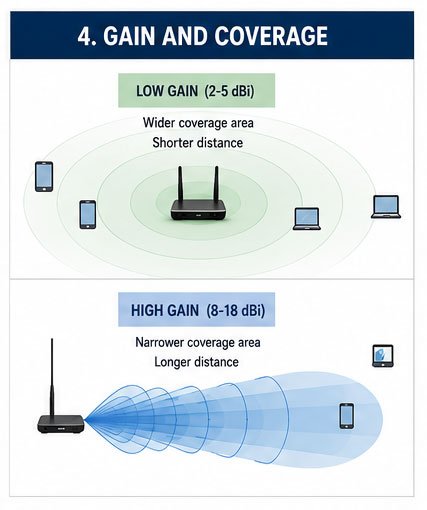
Home environments have specific challenges. You have walls, furniture, and appliances. These all block WiFi signal. You need antennas that spread signal evenly in all directions. Omnidirectional antennas do this perfectly.
Most home routers come with 2-3 dBi internal antennas. These work fine for apartments under 80 square meters. For larger homes, upgrade to external 5-8 dBi antennas. I did this in my own house. Signal in the far bedroom jumped from two bars to full strength.
WiFi 6 and WiFi 7 change things a bit. WiFi 6 uses OFDMA technology. It handles multiple devices better. Your antenna doesn't need to work harder, but it needs to maintain consistent signal to all devices. WiFi 7 introduces multi-band simultaneous transmission. If your router supports WiFi 7, make sure your antennas support both 2.4GHz, 5GHz, and the new 6GHz band.
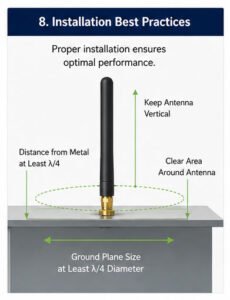
For home use, I recommend starting with dual-band omnidirectional antennas. These cover both 2.4GHz and 5GHz. Mount them vertically on your router. Keep them away from metal objects. Metal reflects WiFi signal. Place your router in a central location, not in a corner or closet.
Industrial environments demand more. You face larger areas, concrete walls, metal structures, and interference from machinery. Standard home antennas fail completely here.
Industrial sites need site surveys first. Walk the area. Mark dead zones. Measure distances. Check for metal barriers. I always do this before recommending antennas. One customer skipped the survey. Bought 20 antennas. Half of them didn't work in their positions. They had to reorder.
For warehouses and factories, I typically design a network with multiple access points. Each access point gets a 8-12 dBi omnidirectional antenna mounted 5-8 meters high. This creates overlapping coverage zones. Devices hand off smoothly between access points.
For outdoor industrial sites like ports, mines, or large campuses, directional antennas work better. Place panel antennas at strategic points. Point them to cover specific zones. A 15 dBi panel antenna can cover a 60-degree sector out to 500 meters with clear line-of-sight.
Industrial antennas must handle weather. Temperature swings from -40°C to +70°C. Rain, snow, ice, and UV exposure. We use fiberglass radomes, not plastic. Fiberglass doesn't degrade in UV light. All our industrial antennas pass 1000-hour salt spray tests.
Power handling is another difference. Home antennas handle 2-10 watts typically. Industrial antennas need to handle 20-50 watts or more for long-range point-to-point links. This requires better connectors and thicker cables.
| Aspect | Home Antenna | Industrial Antenna |
|---|---|---|
| Coverage pattern | Omnidirectional 360° | Directional or sector-based |
| Typical gain | 3-8 dBi | 12-24 dBi |
| Frequency | Dual-band 2.4/5GHz | Often single-band optimized |
| Construction | Plastic housing | UV-resistant fiberglass |
| Weather rating | Indoor (no rating needed) | IP67 or better |
| Temperature range | 0°C to 40°C | -40°C to +70°C |
| Connector type | RP-SMA | N-type weatherproof |
| Power handling | 2-10 watts | 20-50+ watts |
| Mounting | Desktop or wall | Pole/wall with robust brackets |
| Expected lifetime | 3-5 years | 10+ years |
2026 WiFi Antenna Buying Guide: How to Select the Best Long-Range Antenna
Buying the wrong antenna wastes money and time. I've seen customers spend thousands on antennas that didn't fit their needs. Let me show you the buying process I use.
When buying WiFi antennas in 2026, prioritize these factors in order: frequency compatibility with your equipment, required gain for your distance, connector type matching, VSWR specification below 1.5, and warranty/support from a manufacturer with proven export experience.
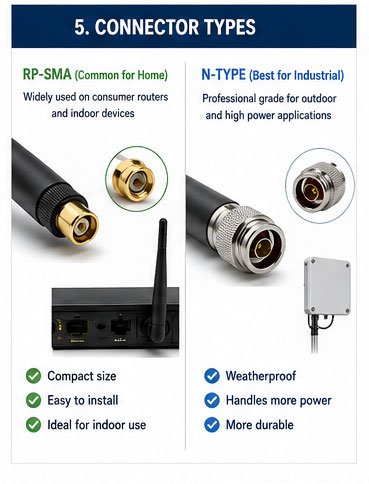
Start with your equipment specifications. Check your router or access point manual. What frequencies does it support? What connector type does it have? What is the maximum antenna gain it can handle? Some devices limit antenna gain. Using a higher-gain antenna than specified can actually reduce performance.
Next, calculate your link budget. This sounds technical but it's simple. Your transmitter power (in dBm) plus your antenna gain (in dBi) minus your path loss (in dB) should equal at least -80 dBm at the receiver. Most WiFi devices need -70 to -80 dBm to maintain a stable connection.
Here's a real example. A customer needed WiFi across 400 meters with some trees in between. Their router transmitted at 20 dBm (100 mW). Path loss at 2.4GHz over 400 meters with trees was about 110 dB. They needed: 20 dBm + antenna gain - 110 dB ≥ -70 dBm. So antenna gain needed to be at least 20 dB total (10 dB on each side). We recommended two 12 dBi panel antennas. Problem solved.
Check the antenna's VSWR across the full frequency range. Some manufacturers only specify VSWR at center frequency. This is misleading. WiFi uses channels spanning 20-80 MHz. Your antenna needs good VSWR across the entire channel bandwidth. We test every antenna model across all WiFi channels before certification.
Look at the radiation pattern charts. These show how the antenna radiates signal in different directions. For omnidirectional antennas, the pattern should be circular in the horizontal plane. For directional antennas, check the beamwidth. A 60-degree beamwidth means the signal spreads 60 degrees in the specified plane.
Consider the mechanical specs. Wind loading matters for outdoor antennas. In coastal areas or high-altitude sites, wind can reach 150+ km/h. Your antenna and mounting hardware must handle this. We rate all our outdoor antennas for wind speeds up to 180 km/h.
Verify the manufacturer's certifications. For export to Europe, look for CE marking. For North America, check FCC compliance. For other regions, verify local regulatory compliance. We maintain certifications for over 50 countries. This saves our customers months of approval time.
Ask about MOQ (minimum order quantity). Many antenna manufacturers require 1000-5000 piece minimum orders. This doesn't work for testing or small projects. We offer 100-piece MOQ for standard models. For custom designs, we can quote based on your specific needs.
Check lead times carefully. Standard antennas should ship within 7-15 days. Custom designs take 30-45 days including tooling and testing. We keep stock of popular models to support fast delivery.
Don't forget about cables and accessories. You'll need appropriate length cables, mounting brackets, and weatherproofing materials. We offer complete assembly services. Customers receive ready-to-install antenna systems with all necessary hardware.
Review the warranty terms. Standard warranty should be 12-24 months minimum. Some manufacturers offer longer warranties for industrial products. We provide 24-month warranty on all antennas and lifetime technical support. If there's a problem, we'll solve it.
| Buying Checklist | What to Verify | Why It Matters |
|---|---|---|
| Frequency compatibility | Matches your device (2.4/5/6GHz) | Wrong frequency = no signal |
| Gain specification | Appropriate for your distance | Too low = weak signal, too high = may violate regulations |
| VSWR performance | <1.5 across full bandwidth | Higher VSWR = wasted power |
| Connector type | Matches your equipment | Incompatible = can't connect |
| Weather rating | IP67+ for outdoor use | Inadequate = early failure |
| Radiation pattern | Matches your coverage needs | Wrong pattern = dead zones |
| Certifications | CE/FCC/local regulatory | Missing certs = legal issues |
| Manufacturer experience | 10+ years with export track record | New manufacturer = risk |
| MOQ flexibility | Acceptable minimum quantity | Too high = can't test properly |
| Lead time | Meets your project schedule | Long delays = project problems |
| Warranty & support | 24+ months with technical support | Short warranty = hidden problems |
How to Pick the Right Long-Range WiFi Antenna: A 2026 Buyer's Guide
Picking the right antenna requires understanding your specific use case. Generic advice doesn't work. Let me show you how to