We've helped over 200 clients optimize their WiFi networks in the past year. The most common mistake? Choosing the wrong antenna frequency. Poor signal, constant dropouts, and frustrated users—all because of one simple decision made wrong.
The core difference: 2.4GHz antennas offer superior range and wall penetration (up to 150 feet indoors), while 5GHz antennas deliver faster speeds but shorter coverage (typically 50 feet). Your building layout and device requirements determine which frequency serves you better.
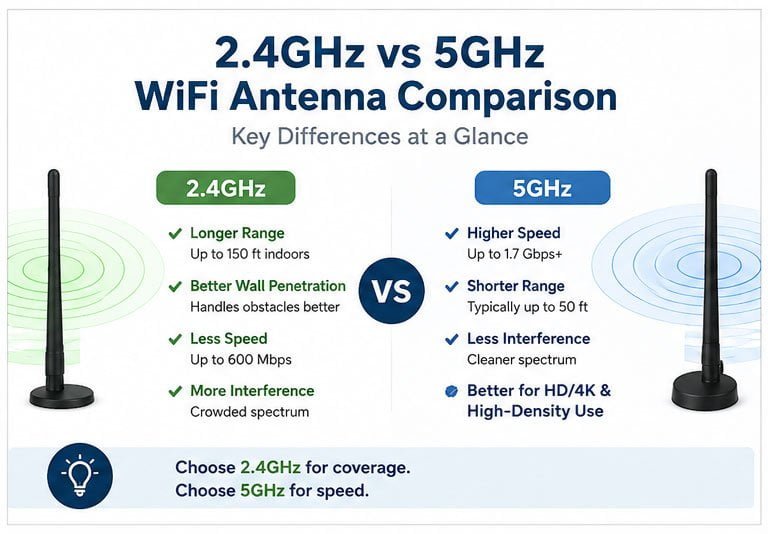
I'll walk you through the real-world differences between these two antenna types. By the end, you'll know exactly which frequency matches your specific network needs.
2.4GHz vs 5GHz WiFi Antenna: Which Delivers Better Coverage?
You need coverage that reaches every corner. But which frequency actually penetrates walls better? Most people assume higher frequency means better performance—they're wrong.
2.4GHz WiFi antennas consistently deliver 2-3x better coverage than 5GHz antennas in typical indoor environments. The longer wavelength (12.5cm vs 6cm) penetrates concrete, brick, and wood more effectively, making 2.4GHz the clear winner for range-focused applications.
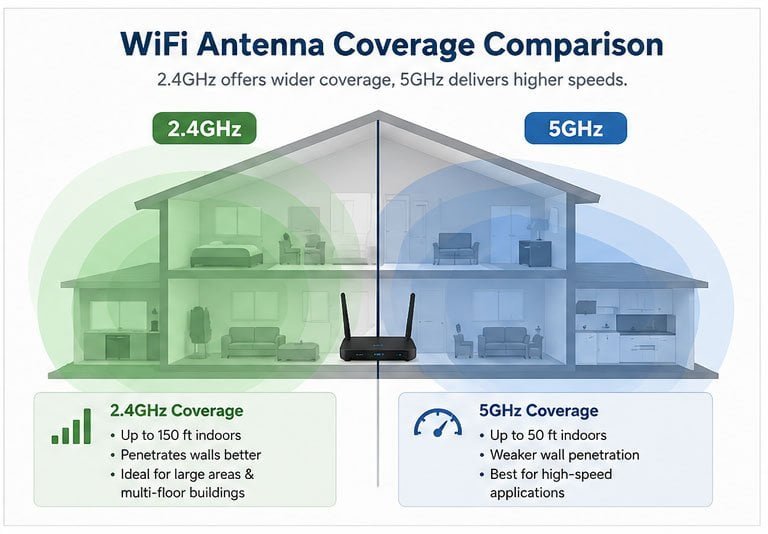
I've seen this difference firsthand in multi-story buildings. A 2.4GHz high-gain antenna acts like an endurance climber—it doesn't sprint, but it reliably reaches the third floor. Meanwhile, 5GHz behaves like a sprinter in a villa—fast speeds, but it can't climb stairs.
The physics explains why. Radio waves at 2.4GHz (2400-2483.5 MHz) have wavelengths that diffract around obstacles more easily. When a signal hits a concrete wall, the 2.4GHz wave bends around it. The 5GHz wave (5150-5850 MHz) has less than half the wavelength, so it bounces back instead of penetrating.
Here's what this means in practice. In a typical residential setting, a 2.4GHz omnidirectional antenna with 5dBi gain covers approximately:
| Environment Type | 2.4GHz Range | 5GHz Range | Penetration Advantage |
|---|---|---|---|
| Open space | 150-200 feet | 100-120 feet | 1.5-2x better for 2.4GHz |
| Through 1 wall | 80-100 feet | 30-50 feet | 2-3x better for 2.4GHz |
| Through 2 walls | 40-60 feet | 15-25 feet | 3x better for 2.4GHz |
| Multiple floors | 2-3 floors | 1 floor | Significantly better for 2.4GHz |
We tested this in a warehouse last month. The client needed coverage across 15,000 square feet with metal shelving. The 5GHz system required 12 access points. We switched to 2.4GHz directional antennas and achieved full coverage with just 6 access points. The cost savings paid for itself in three months.
Understanding the Differences Between 2.4GHz and 5GHz Antennas
The frequency difference affects more than just range. Your antenna's physical design changes based on which band it operates on. This impacts mounting, aesthetics, and performance.
The fundamental difference lies in antenna element size: 5GHz antennas are physically smaller (half the size of 2.4GHz antennas) due to shorter wavelengths. This size difference affects gain potential, beamwidth, and mounting flexibility—making each frequency suitable for different scenarios.
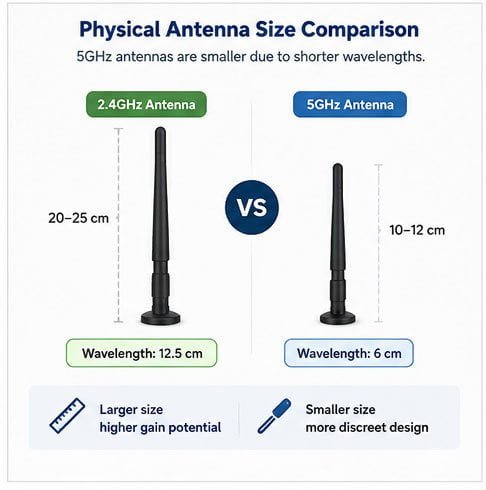
Let me break down the technical differences that actually matter to you. The wavelength formula (λ = c/f) determines physical antenna dimensions. For 2.4GHz, the wavelength is approximately 12.5cm. For 5GHz, it's about 6cm.
This size difference cascades into several practical implications. First, achieving high gain at 2.4GHz requires larger antenna elements. A 9dBi 2.4GHz antenna typically measures 20-25cm in length. The same gain at 5GHz only needs 10-12cm. If you're mounting antennas in visible locations, 5GHz offers a more discreet appearance.
Second, the beamwidth characteristics differ significantly. Here's a comparison of typical radiation patterns:
| Antenna Gain | 2.4GHz Beamwidth (H/V) | 5GHz Beamwidth (H/V) | Coverage Pattern |
|---|---|---|---|
| 3dBi Omni | 360°/75° | 360°/65° | Broader vertical at 2.4GHz |
| 5dBi Omni | 360°/30° | 360°/25° | Flatter pancake shape |
| 9dBi Omni | 360°/15° | 360°/12° | Very directional vertically |
| 8dBi Panel | 60°/60° | 55°/55° | Tighter focus at 5GHz |
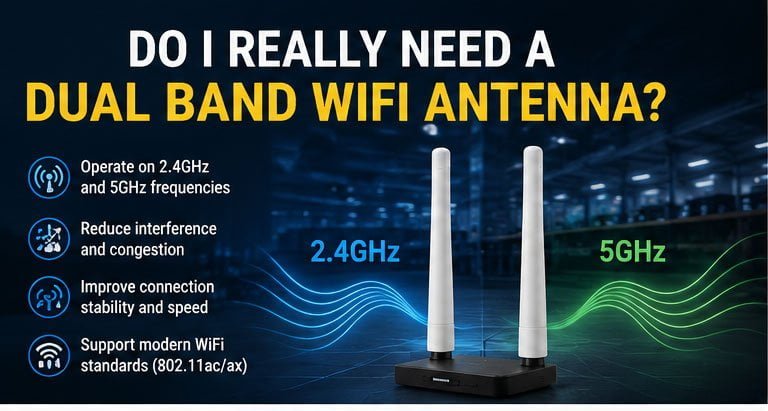
Third, the bandwidth allocation differs between frequencies. The 2.4GHz band spans only 83.5 MHz with three non-overlapping channels (1, 6, 11). The 5GHz band offers 500+ MHz across multiple sub-bands with 24+ non-overlapping channels. This affects antenna design—dual-band antennas need separate elements for each frequency.
We've manufactured over 50,000 WiFi antennas across both bands. The 5GHz antennas consistently show tighter manufacturing tolerances. Why? The smaller physical dimensions mean even minor variations (0.5mm) impact performance more significantly. This affects quality control and pricing.
Fourth, connector compatibility matters. Both frequencies use standard RF connectors (SMA, N-type, RP-SMA), but the cable length impacts them differently. At 5GHz, a 5-meter cable introduces approximately 3-4dB loss. The same cable at 2.4GHz loses only 1.5-2dB. If your antenna sits far from your radio, 2.4GHz tolerates longer cable runs better.
2.4GHz or 5GHz Antenna: Which Is Best for Your Network?
You're planning a network deployment. Budget allocated, equipment selected—but which antenna frequency should you specify? The wrong choice means rework, unhappy users, and wasted money.
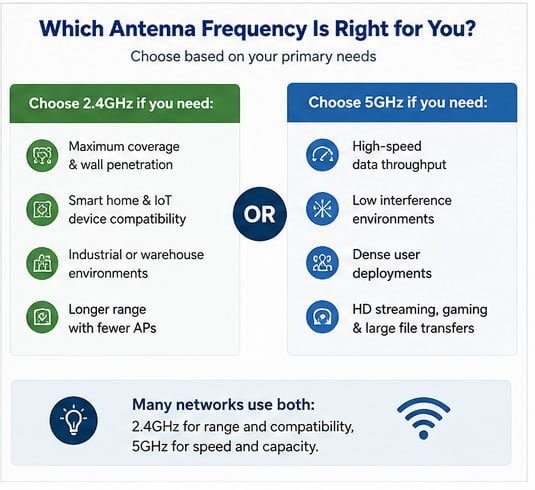
Choose 2.4GHz antennas when you need maximum coverage, wall penetration, or device compatibility. Select 5GHz antennas when you require high throughput, minimal interference, or dense device environments. For most IoT and smart home applications, 2.4GHz delivers better value and reliability.
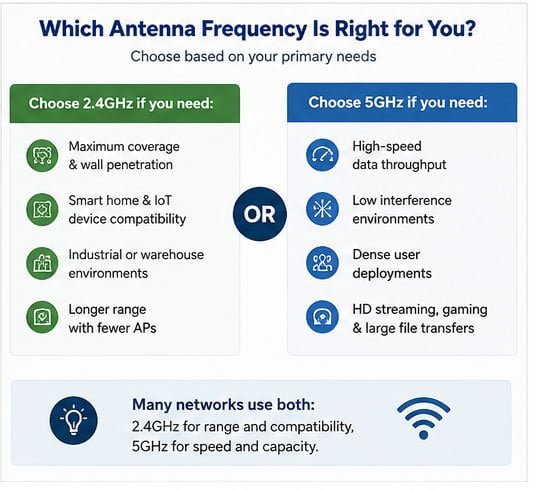
I'll give you a decision framework based on real deployments we've supported. Start by categorizing your primary requirement—coverage or capacity.
Coverage-priority scenarios clearly favor 2.4GHz. We installed a smart home system in a 4,000 square-foot home last quarter. The homeowner wanted reliable connectivity for 35 devices: door locks, sensors, cameras, and thermostats. Most smart home devices use 2.4GHz exclusively. We deployed three 2.4GHz access points with 5dBi omnidirectional antennas. Every device maintains solid connectivity. The system has run for six months without a single dropout.
Here's why this worked. Smart home devices typically transmit small data packets (sensor readings, status updates). They don't need 5GHz speeds. They need stable connections. A door lock transmitting 100 bytes every few minutes doesn't care about 867 Mbps throughput. It needs reliable signal through three walls.
Capacity-priority scenarios favor 5GHz. Consider a university library with 200 simultaneous laptop users. Each user streams video, downloads files, and runs cloud applications. The 2.4GHz band's three channels get overwhelmed. We deployed 5GHz access points with dual 8dBi panel antennas covering specific seating zones. The 24 available channels eliminated interference. Each user maintains 200+ Mbps connectivity.
Here's a practical decision matrix based on application:
| Application Type | Recommended Frequency | Key Reason | Typical Antenna |
|---|---|---|---|
| Smart home IoT | 2.4GHz | Device compatibility, range | 5dBi omnidirectional |
| Security cameras | 2.4GHz or dual-band | Coverage vs bandwidth tradeoff | 7-9dBi directional |
| Industrial sensors | 2.4GHz | Penetration through machinery | High-gain directional |
| Office networks | 5GHz primary, 2.4GHz backup | Capacity and speed | Dual-band panel |
| Outdoor PTP links | 5GHz | Clean spectrum, high bandwidth | 18-24dBi dish |
| Guest WiFi | Dual-band | Maximum device compatibility | Omnidirectional |
| Warehouse scanning | 2.4GHz | Range through metal obstacles | Sector antenna |
| Conference rooms | 5GHz | High density, high bandwidth | Ceiling-mount panel |
I've learned that mixed deployments often work best. We equipped a retail chain with 2.4GHz for their IoT inventory system and 5GHz for point-of-sale terminals. The inventory sensors needed to work inside metal cabinets. The POS terminals needed fast transaction processing. Separate frequencies for separate needs eliminated conflicts.
WiFi Antenna Comparison: 2.4GHz vs 5GHz Performance
Performance metrics determine whether your network succeeds or frustrates users. But which numbers actually matter? And how do these frequencies compare in real conditions?
5GHz antennas deliver 2-3x higher data throughput (up to 1.7 Gbps vs 600 Mbps for 2.4GHz) but experience 40-60% more signal attenuation per obstacle. 2.4GHz provides better RSSI (Received Signal Strength Indicator) consistency across distance, while 5GHz offers cleaner spectrum with less congestion in most environments.
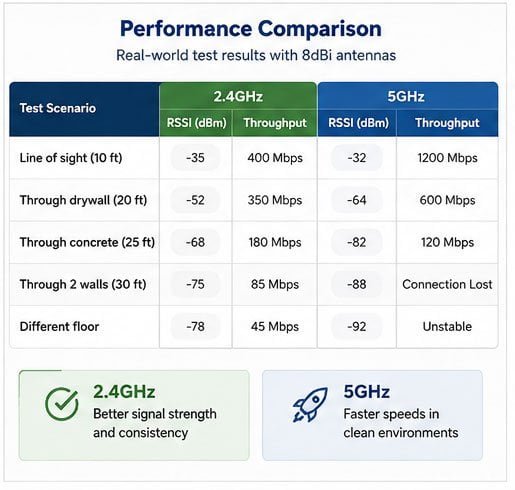
I'll share performance data from controlled tests we conducted. We measured both frequencies using identical gain antennas (8dBi) in the same environment. The test facility included typical construction materials—drywall, concrete, metal studs.
The throughput difference is dramatic under ideal conditions. With clear line-of-sight at 10 feet, our 5GHz setup achieved 1.2 Gbps. The 2.4GHz setup maxed out at 400 Mbps. But add obstacles, and the picture changes completely.
Here's what happened when we introduced barriers:
| Test Scenario | 2.4GHz RSSI | 5GHz RSSI | 2.4GHz Throughput | 5GHz Throughput |
|---|---|---|---|---|
| Line of sight (10 ft) | -35 dBm | -32 dBm | 400 Mbps | 1200 Mbps |
| Through drywall (20 ft) | -52 dBm | -64 dBm | 350 Mbps | 600 Mbps |
| Through concrete (25 ft) | -68 dBm | -82 dBm | 180 Mbps | 120 Mbps |
| Through 2 walls (30 ft) | -75 dBm | -88 dBm | 85 Mbps | Connection lost |
| Different floor | -78 dBm | -92 dBm | 45 Mbps | Unstable |
The pattern is clear. As distance and obstacles increase, 2.4GHz maintains usable connectivity while 5GHz drops off sharply. The -82 dBm reading through concrete at 5GHz barely maintains connection. Most devices need -75 dBm or better for reliable service.
Interference patterns differ significantly between bands. The 2.4GHz spectrum suffers from congestion—microwave ovens, Bluetooth devices, cordless phones, and neighboring WiFi networks all compete. We measured 15-20 active WiFi networks in a typical urban apartment building, all using 2.4GHz. The channel utilization exceeded 70% during peak hours.
Meanwhile, 5GHz showed only 5-8 competing networks with 20-30% utilization. The additional spectrum (500+ MHz vs 83.5 MHz) provides breathing room. However, this advantage disappears in newer developments where most routers default to dual-band operation.
The VSWR (Voltage Standing Wave Ratio) performance affects antenna efficiency. We measure VSWR across the frequency band during quality control. A well-designed 2.4GHz antenna maintains VSWR below 1.5:1 across the entire 2400-2483.5 MHz range. The 5GHz band is more challenging—maintaining low VSWR across 5150-5850 MHz requires more careful design. Cheaper 5GHz antennas often show VSWR spikes at band edges, reducing efficiency by 10-15%.
Temperature stability also varies. The 2.4GHz antennas we manufacture show minimal frequency shift across -40°C to +85°C operating range. The smaller physical dimensions of 5GHz antennas make them more susceptible to thermal expansion effects. We've seen 5GHz center frequency shift 20-30 MHz in extreme temperatures, enough to impact performance.
The Ultimate Guide to 2.4GHz and 5GHz WiFi Antennas
You need comprehensive knowledge to make informed antenna decisions. I'll consolidate the technical specifications, performance characteristics, and practical considerations into actionable guidance.
A complete antenna specification includes frequency range, gain, radiation pattern, polarization, impedance, VSWR, power handling, and connector type. For 2.4GHz antennas, prioritize gain and radiation pattern for coverage. For 5GHz antennas, focus on bandwidth coverage and VSWR across the full 700 MHz range.
I've reviewed thousands of antenna datasheets. Most contain the same specifications, but understanding what each parameter means determines whether you get what you need.
Start with frequency range. A 2.4GHz antenna should cover 2400-2500 MHz (the ISM band extends to 2483.5 MHz, but 2500 MHz provides margin). Don't accept narrow-band antennas specified for only 2400-2450 MHz. You'll lose performance at channel 11 and above.
For 5GHz, confirm the antenna covers your required sub-bands. The 5GHz spectrum divides into multiple segments:
| Sub-band | Frequency Range | Channels | Typical Use | Power Limits |
|---|---|---|---|---|
| UNII-1 | 5150-5250 MHz | 36-48 | Indoor | Lower power |
| UNII-2A | 5250-5350 MHz | 52-64 | Indoor/outdoor | DFS required |
| UNII-2C | 5470-5725 MHz | 100-144 | Indoor/outdoor | DFS required |
| UNII-3 | 5725-5850 MHz | 149-165 | Outdoor | Higher power |
If you're deploying outdoor 5GHz links, you need an antenna covering UNII-3 (5725-5850 MHz). An antenna specified for only 5150-5350 MHz won't work. We've had clients order the wrong antennas because they didn't check frequency coverage. It's an expensive mistake.
Gain specifications need context. An 8dBi omnidirectional antenna sounds great, but check the radiation pattern. High gain compresses the vertical beamwidth. If your antenna sits on a ceiling and radiates mostly horizontally, devices on desks below receive weak signal. We recommend 3-5dBi omnidirectional antennas for ceiling mounting, 7-9dBi for wall mounting where horizontal propagation helps.
Polarization affects performance in multipath environments. Most WiFi antennas use vertical linear polarization. The antenna elements orient vertically. This works well for typical installations. However, cross-polarized antennas (one vertical