You need a wireless antenna for your device, but the options feel overwhelming. You see 2.4G and 5.8G everywhere, different gain numbers, and confusing terms like "omnidirectional" and "directional." You worry about picking the wrong one and wasting money on equipment that won't work for your application.
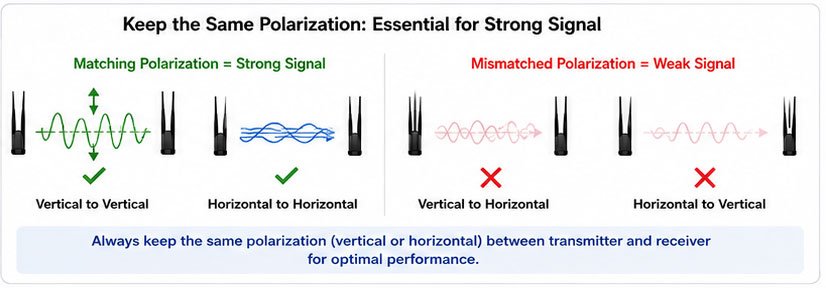
The right antenna choice depends on your environment and use case: 2.4G antennas work better through walls and obstacles, while 5.8G antennas offer faster speeds with less interference in open spaces. Match the antenna type (omnidirectional or directional) to your coverage needs, and always keep the same polarization between transmitter and receiver.
I've helped hundreds of customers select the right antennas over the past 17 years. The confusion usually comes from not understanding what each frequency band does best. Let me walk you through everything you need to know to make the right choice.
The Ultimate Guide to Choosing 2.4G and 5.8G Antennas: What Makes Them Different?
Most people think higher frequency is always better. That's not true. Each frequency band has specific strengths that match different scenarios.
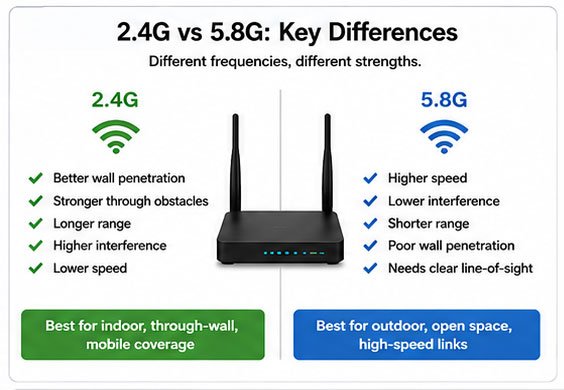
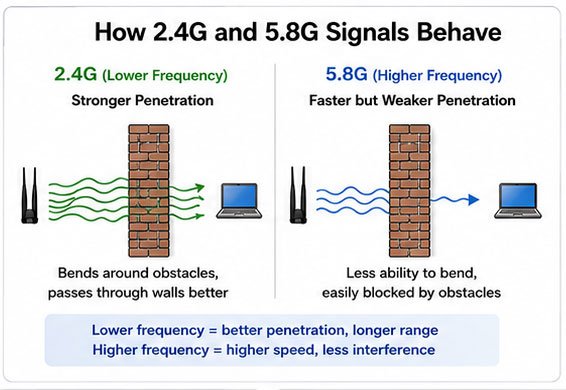
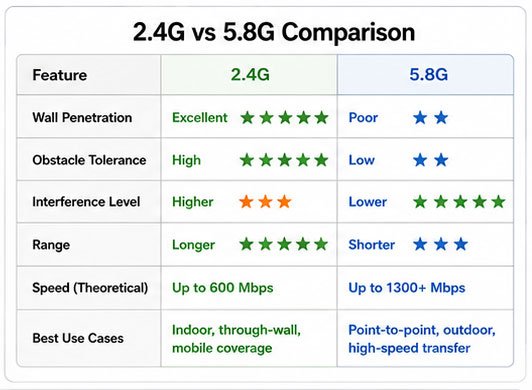
2.4G antennas use lower frequency waves that penetrate walls and obstacles better, making them ideal for indoor environments. 5.8G antennas use higher frequency waves that carry more data but require clearer line-of-sight, making them perfect for outdoor or open-space applications with minimal obstructions.
I remember working with a warehouse client last year. They insisted on using 5.8G throughout their facility because they wanted "the fastest speeds." After installation, they had dead zones everywhere. We switched problem areas to 2.4G antennas, and suddenly their coverage became reliable.
The physical behavior of radio waves explains this. Lower frequencies bend around objects more easily. Higher frequencies travel faster but bounce off or get absorbed by obstacles. This is physics, not marketing talk.
Here's what you need to consider for each band:
2.4G Antenna Characteristics
| Feature | Performance |
|---|---|
| Wall penetration | Excellent |
| Obstacle tolerance | High |
| Interference level | Higher (many devices use this band) |
| Range | Longer |
| Speed | Up to 600 Mbps (theoretical) |
| Best use cases | Indoor coverage, through-wall scenarios, mobile coverage |
5.8G Antenna Characteristics
| Feature | Performance |
|---|---|
| Wall penetration | Poor |
| Obstacle tolerance | Low |
| Interference level | Lower (less crowded) |
| Range | Shorter |
| Speed | Up to 1300+ Mbps (theoretical) |
| Best use cases | Point-to-point links, outdoor line-of-sight, high-speed transfer |
I often see customers mixing both bands in one deployment. A shopping mall used 2.4G antennas in hallways with walls and columns, but installed 5.8G in the open food court. This hybrid approach gave them both coverage and speed where each mattered most.
The interference factor is real. In a typical office building, I can detect 20+ networks on 2.4G but only 5-8 on 5.8G. If your environment has many wireless devices already, 5.8G will perform more consistently.
How to Select the Right 2.4G/5.8G Antenna: Which Antenna Pattern Fits Your Needs?
Antenna pattern confuses more people than frequency selection. The pattern determines where your signal goes, not how far.
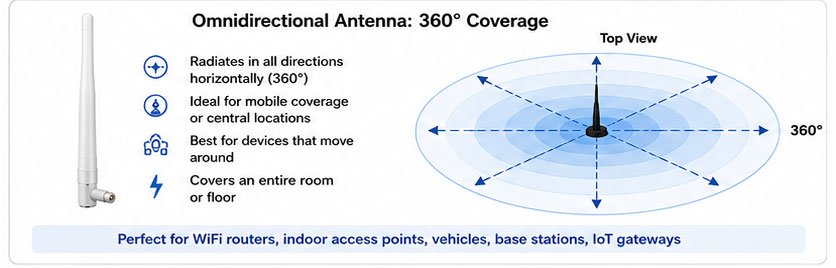
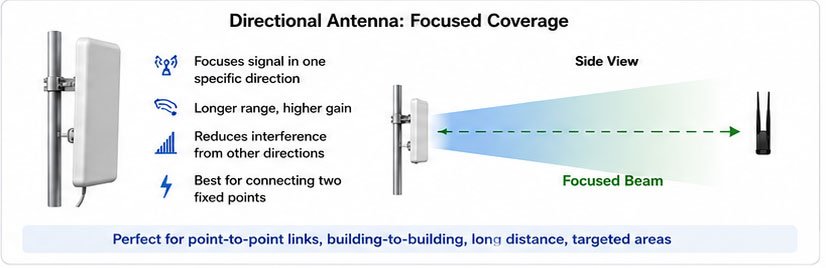
Omnidirectional antennas radiate signal in all directions horizontally (360 degrees), making them perfect for mobile coverage or central-location installations. Directional antennas focus signal in one specific direction, providing longer range and higher gain for point-to-point links or targeted coverage areas.
Think of omnidirectional antennas like a light bulb hanging from the ceiling. The light spreads everywhere. Directional antennas work like a flashlight beam, concentrating energy in one direction.
I use this rule: if devices move around, choose omnidirectional. If you're connecting two fixed points, choose directional.
Choosing Omnidirectional Antennas
You need omnidirectional antennas when:
- Devices move throughout the coverage area
- You want to cover an entire room or floor
- The antenna sits in a central location
- You need 360-degree horizontal coverage
- Multiple clients connect from different directions
Common applications include:
| Application | Why Omnidirectional Works |
|---|---|
| WiFi routers | Devices connect from all sides |
| Indoor access points | Users walk around the space |
| Vehicle antennas | Direction constantly changes |
| Base station antennas | Serve multiple endpoints |
| IoT gateways | Sensors spread across area |
The trade-off with omnidirectional antennas is that they spread power in all directions, which means less gain in any single direction. A 5 dBi omnidirectional antenna doesn't reach as far as a 12 dBi directional antenna.
Choosing Directional Antennas
Directional antennas make sense when:
- You connect two fixed points
- Distance is a priority
- You want to avoid interference from other directions
- Coverage needs focus on a specific area
- You need maximum gain
We manufactured a project for a farm last month. They needed to connect their main barn to a field monitoring station 800 meters away. An omnidirectional antenna couldn't reach. We installed 14 dBi directional antennas at both ends, and the link worked perfectly.
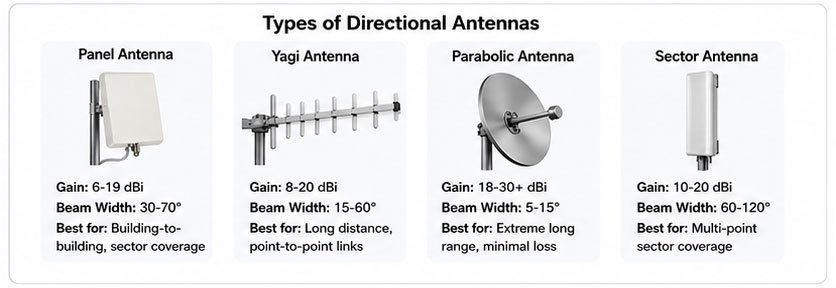
Types of directional antennas:
| Type | Gain Range | Beam Width | Best For |
|---|---|---|---|
| Panel antenna | 6-19 dBi | 30-70° | Building-to-building links |
| Yagi antenna | 9-16 dBi | 30-50° | Point-to-point medium range |
| Parabolic antenna | 18-30+ dBi | 8-20° | Long-distance point-to-point |
| Sector antenna | 12-18 dBi | 60-90° | Targeted area coverage |
The narrower the beam, the higher the gain. But you must aim carefully. A 1-degree misalignment on a high-gain antenna can mean total signal loss.
2.4G vs. 5.8G Antennas: How Does Your Environment Affect Performance?
Your physical environment decides which frequency works better. I see people ignore this and wonder why their expensive equipment underperforms.
2.4G signals penetrate concrete, drywall, and wood effectively, making them superior for cluttered indoor environments with walls and obstacles. 5.8G signals require clear line-of-sight and perform best in outdoor scenarios or large open indoor spaces with minimal obstructions between transmitter and receiver.
A customer called me frustrated last week. Their 5.8G bridge stopped working when trees grew leaves in spring. I wasn't surprised. Foliage absorbs 5.8G signals much more than 2.4G. We added a small 2.4G backup link, and their system became weather-proof.
Material Impact on Signal
Different materials affect each frequency differently:
| Material | 2.4G Loss | 5.8G Loss | Impact Level |
|---|---|---|---|
| Drywall | 3 dB | 4-5 dB | Low |
| Wood door | 3-4 dB | 5-6 dB | Low |
| Concrete wall | 10-15 dB | 15-20 dB | High |
| Brick wall | 8-12 dB | 12-18 dB | High |
| Metal/aluminum | 20-30 dB | 25-35 dB | Very High |
| Tinted glass | 6-8 dB | 10-15 dB | Medium |
| Human body | 3-5 dB | 5-8 dB | Medium |
| Foliage (trees) | 5-10 dB | 15-25 dB | Variable |
The numbers show clear patterns. Metal is terrible for both frequencies. Foliage hits 5.8G much harder. Concrete affects both but hurts 5.8G more.
Environment-Based Selection
I use these guidelines for different environments:
Indoor residential or office:
- Use 2.4G for multi-room coverage
- Use 5.8G in open office spaces
- Consider dual-band antennas for flexibility
Indoor warehouse or factory:
- Primarily 2.4G due to metal obstacles
- Place access points strategically to minimize through-metal paths
- Higher gain omnidirectional antennas for better penetration
Outdoor line-of-sight:
- Prefer 5.8G for less interference and higher speed
- Use directional antennas for point-to-point
- Ensure clear Fresnel zone (the invisible signal path)
Outdoor with obstacles:
- Use 2.4G when trees or buildings block path
- Consider multiple smaller links instead of one long link
- Plan for seasonal changes (foliage)
Vehicle or mobile:
- Use 2.4G for better non-line-of-sight performance
- Omnidirectional antennas are essential
- Lower gain (2-5 dBi) prevents null zones during movement
We installed a monitoring system across a small town last year. Buildings blocked some paths. We used 5.8G for clear roof-to-roof shots and 2.4G for links through neighborhoods. The mixed approach gave us reliable coverage everywhere.
A Beginner's Guide to 2.4G and 5.8G Antenna Selection: What Do Gain and VSWR Really Mean?
Technical specifications intimidate beginners. You see numbers like "5 dBi" or "VSWR < 2.0" and don't know if they're good or bad.
Antenna gain (measured in dBi) indicates how well an antenna focuses energy compared to a theoretical perfect antenna - higher gain means longer range but narrower coverage. VSWR (Voltage Standing Wave Ratio) measures how efficiently your antenna uses transmitted power - lower VSWR means less power wasted, with values below 2.0 considered acceptable.
Let me break down the specifications that actually matter.
Understanding Antenna Gain
Gain doesn't mean the antenna creates more power. It means the antenna focuses existing power in a specific direction, like a mirror focuses light.
Here's how to interpret gain values:
| Gain (dBi) | Type | Pattern | Best Use |
|---|---|---|---|
| 2-3 dBi | Low gain omni | Very wide | Close-range, all directions |
| 5-7 dBi | Medium gain omni | Wide | Standard WiFi coverage |
| 9-12 dBi | High gain omni | Moderate | Long-range mobile coverage |
| 8-14 dBi | Directional | Focused | Point-to-point medium range |
| 15-24 dBi | High gain directional | Narrow | Long-distance links |
| 25+ dBi | Very high gain | Very narrow | Extreme distance point-to-point |
A common mistake: customers ask for "the highest gain possible" without understanding the trade-off. A 15 dBi omnidirectional antenna has such a flat radiation pattern that devices directly above or below might not connect.
I recommended a 5 dBi antenna to a customer who wanted 9 dBi for their access point. They were confused until I explained that their ceiling height would create coverage gaps with higher gain. Sometimes less gain means better coverage.
Decoding VSWR
VSWR measures impedance matching between your antenna and cable. Perfect match is 1.0:1, but that's impossible in real-world conditions.
| VSWR Value | Power Reflected | Performance | Rating |
|---|---|---|---|
| 1.0:1 | 0% | Perfect (theoretical) | Impossible |
| 1.5:1 | 4% | Excellent | Professional grade |
| 2.0:1 | 11% | Good | Acceptable |
| 3.0:1 | 25% | Poor | Problematic |
| 4.0:1 | 36% | Bad | Unacceptable |
Our antennas typically achieve VSWR below 1.5:1 across the operating band. Some customers ask why we don't guarantee 1.0:1. That's marketing nonsense. Even the best antennas can't achieve perfect VSWR across an entire frequency band.
What VSWR really affects:
- Signal strength (poor VSWR wastes transmit power)
- Receiver sensitivity (poor VSWR reduces received signal)
- Equipment protection (very high VSWR can damage transmitters)
- System efficiency (energy wasted as heat)
Other Critical Specifications
Frequency Range: Make sure the antenna covers your exact operating frequency. A "2.4G" antenna might work from 2400-2500 MHz. If your device uses 2412-2462 MHz, you're covered. But don't assume. Check the datasheet.
Impedance: Almost all WiFi equipment uses 50-ohm impedance. Match this with your antenna. Using a 75-ohm antenna with 50-ohm equipment causes VSWR problems.
Polarization: This determines the orientation of the radio wave. Vertical polarization is standard for most omnidirectional antennas. Horizontal polarization is common for some directional antennas. Your transmit and receive antennas MUST have the same polarization, or you lose 20+ dB of signal.
I helped a customer troubleshoot a weak signal issue last month. Everything seemed right on paper. Then I visited the site. They had installed one antenna vertically and the other horizontally. Rotating one antenna fixed the problem instantly. Always check polarization matching.
Power Handling: Make sure your antenna can handle your transmitter's power output. Most WiFi applications use 100-500 mW, which any standard antenna handles easily. But if you're using amplifiers or higher-power radios, check the antenna's maximum power rating.
2.4G/5.8G Antenna Buying Guide: How Do You Match Connectors and Cables?
You picked the perfect antenna, but it arrives with the wrong connector. This frustration happens constantly because connector types vary widely.
The most common connectors for 2.4G/5.8G antennas are SMA (and reverse-polarity RP-SMA), N-type, and U.FL - you must match the connector type and gender (male/female) to your device, and keep cable length as short as possible because signal loss increases significantly with cable length at these frequencies.
Connector confusion wastes more time than any other factor in antenna selection. Let me clarify the options.
Common Connector Types
Different devices use different connectors. Check your equipment before ordering.
| Connector Type | Size | Common Use | Features |
|---|---|---|---|
| SMA Male | Small | WiFi routers, small radios | Threaded, durable, 18 GHz max |
| RP-SMA Male | Small | Consumer WiFi equipment | Reverse polarity, prevents wrong antennas |
| SMA Female | Small | Antennas for routers | Mates with SMA male |
| RP-SMA Female | Small | Antennas for consumer gear | Mates with RP-SMA male |
| N-Type Male | Large | Base stations, outdoor equipment | Weather-resistant, 11 GHz max |
| N-Type Female | Large | Antennas for base stations | Robust, handles high power |
| U.FL/IPEX | Tiny | Internal device connections | Fragile, for PCB mounting only |
The RP-SMA (reverse polarity) exists because of regulations. Consumer devices in some countries must use RP-SMA to discourage users from installing high-gain antennas. Professional equipment typically uses standard SMA.
I can't count how many times customers have ordered "SMA" antennas only to find they needed "RP-SMA." Always verify which type your device has. Take a close-up photo if you're uncertain.
Understanding Cable Loss
Cable loss is critical at 2.4 and 5.8 GHz. The higher